Features
What's in the current DayZ cheat menu before checkout?
Full DayZ cheat module checklist — aimbot, player ESP, world ESP, item ESP, misc utilities and config options before checkout from $35.
Open features checklist
DayZ · Worldwide · getdayzcheats.com
DayZ cheat for Windows PC — player ESP, loot and world overlays, aimbot tuning and live BattlEye status on official and community servers.
UD
Live BattlEye status for DayZ. Updated after patches — not random Discord screenshots.
“Bought it for ESP and light aim assist. Status stayed honest after the last BattlEye rebuild — finally an honest status shop.”
jayk
DayZ survivor
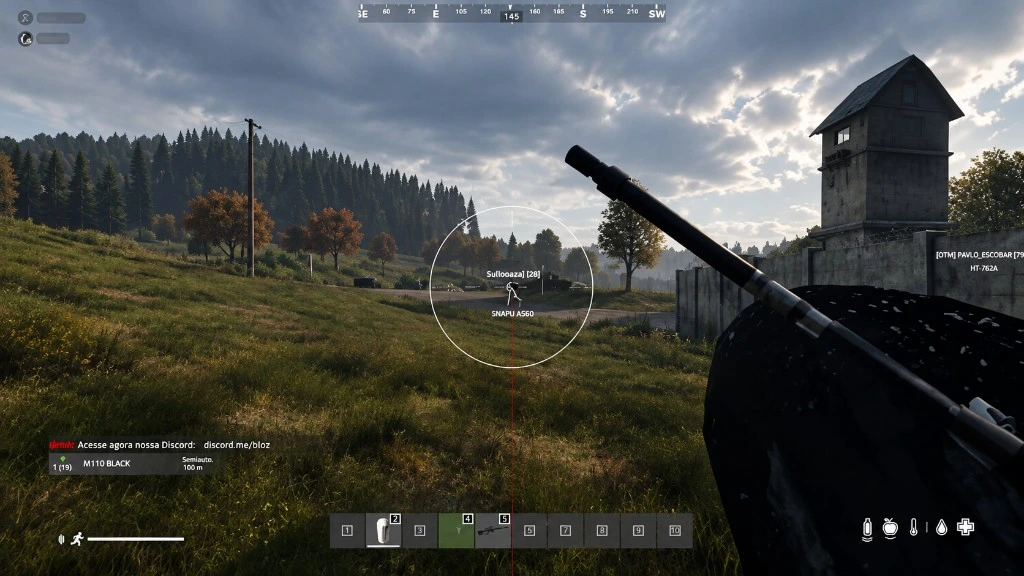
DayZ aimbot
FOV and aim distance, target filters, bone selection and line-to-target styles.
Player ESP
Boxes, skeleton, health, inventory, traces and max distance for survivors.
World & item ESP
Animals, vehicles, helicrash sites, item quality and battle mode filters.
BattlEye status
Clear-to-load or Updating labels after DayZ and BattlEye patches.
Forums
Setup library — aimbot, ESP, loot routing, Windows requirements, BattlEye status and loader fixes before you buy.
Features
Full DayZ cheat module checklist — aimbot, player ESP, world ESP, item ESP, misc utilities and config options before checkout from $35.
Open features checklistAimbot
Configure DayZ cheat aimbot FOV, aim distance, ignore lists and bones so assist stays controllable on community servers.
Open aimbot settings threadESP
Set up DayZ cheat player ESP, animal ESP and item filters without cluttering your screen.
Open ESP setup threadWorld ESP
Use animal, vehicle, helicrash and item quality ESP to route loot runs without drowning in tags.
Open loot ESP threadHotkeys
Menu and toggle hotkeys for DayZ cheats — ESP layers, aimbot hold key and panic binds after a clean load.
Open hotkeys threadSetup
Step-by-step dayz cheats setup: checkout, PC requirements, antivirus exclusions, load order and first ESP profile.
Open full setup threadDayZ Cheats product
Detailed features · BattlEye status · price · checkout
About DayZ Cheats
Buy a DayZ cheat for Windows PC — player ESP, world and item ESP, aimbot options and live BattlEye status with digital delivery after checkout. Clear features, honest status labels, and in-depth setup guides. Then check DayZ feature list, buyer reviews, or loader help.
Checkout
Confirm DayZ Cheats BattlEye status is clear to load, then checkout for digital delivery on supported Windows builds — worldwide.
BattlEye status, Aimbot and ESP, servers, delivery and checkout — before you buy.
Licenses start at $35 on getdayzcheats.com. Duration and exact price are shown at checkout — confirm BattlEye status on the product page before you pay.
After DayZ or BattlEye updates we label the build clear to load or Updating. Do not load while Updating. Status is shown on getdayzcheats.com before you buy or join a server.
Archived forum: BattlEye status after patches
Player ESP covers boxes, skeleton, health, names, distance, inventory, items in hands and traces. World ESP adds animals (with health display), vehicles and helicrash sites. Item ESP can show quality with text or bars, plus battle mode and hover-only modes to reduce on-screen noise.
The build targets DayZ on Steam, including official Bohemia hosts and typical community servers. Modded hosts can behave differently — contact support with the server name if that is your only environment.